AI in Product Development: Where It Helps and Where It Fails
AI has real, measurable uses across the product development cycle, and several loudly marketed ones that do not survive contact with engineering. Here is the honest map.
February 16, 20248 min read

Written by Ashok Chintagunta, MS Computer Science, Louisiana Tech University
CTO & Software Engineer, AI and Automation
Published February 16, 2024Updated September 2, 2026
AI helps product development. It speeds up research. It creates and checks ideas. It aids engineering tasks like making geometry and code. AI also sorts simulation and inspection data. It writes launch content. But AI does not replace owning requirements. It does not replace safety checks. It does not replace compliance calls or physical tests.
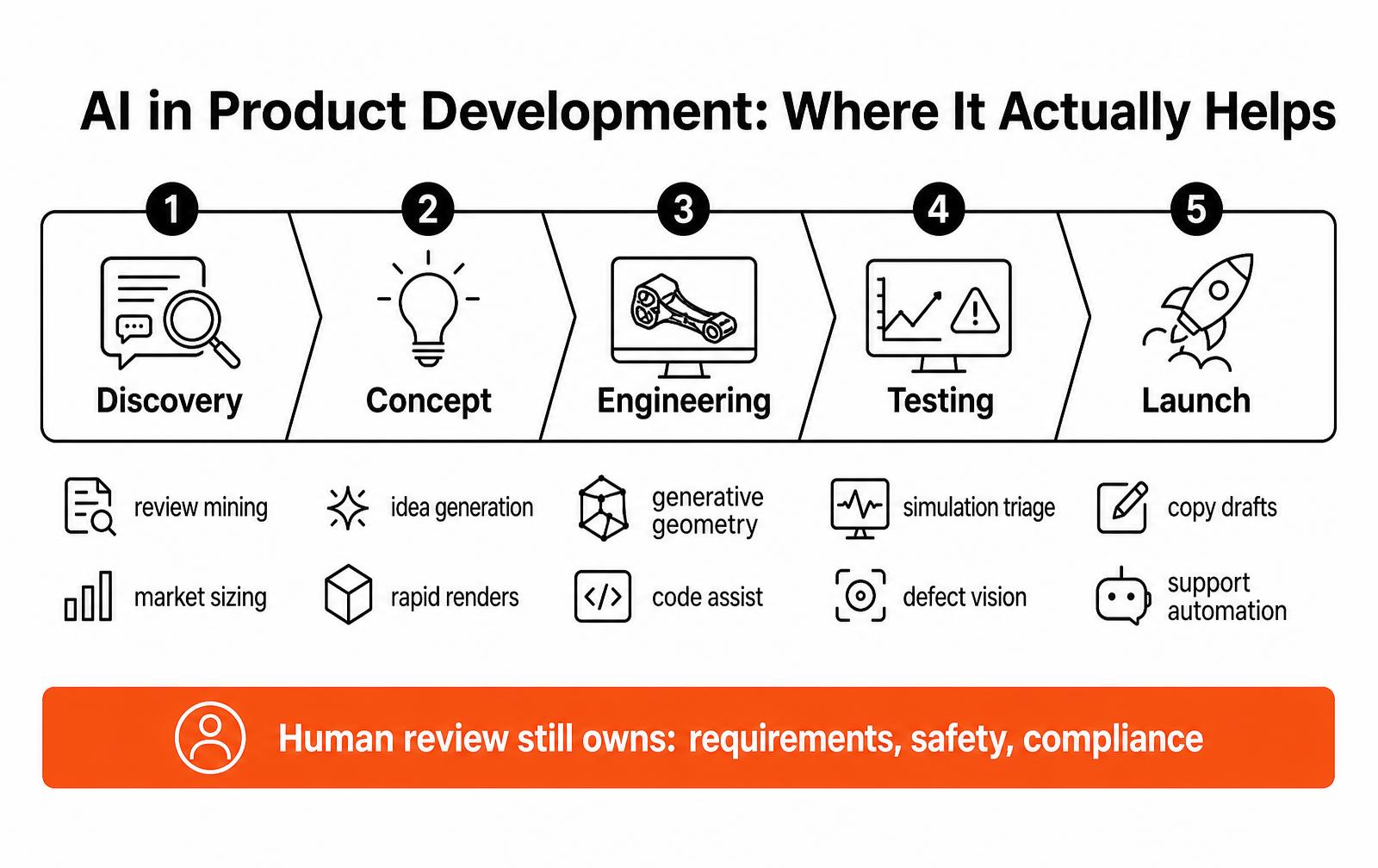
The right question is not, "will AI design our product?" It is, "which tasks are slow?" Also, "which are repetitive?" And, "which allow a rough first pass?" We have good answers to that question now.
Where AI genuinely helps
Discovery and research
- Mining thousands of reviews, support tickets and forum threads for recurring complaints and unmet needs
- Summarizing patent landscapes and competitor feature sets into a comparable table
- Drafting first-pass market sizing that a human then sources and corrects
- Clustering interview transcripts into themes in minutes instead of days
Concept development
Text-to-image tools create many style options in one afternoon. This truly helps align people. It happens before anyone opens CAD. Language models are good at structured idea generation. This means new ideas for a mechanism. Or new business models. Or new names. Many ideas plus human review is better. It beats a few precious ideas.
Engineering
- Generative design produces structurally efficient geometry for weight-critical parts, especially additive ones
- Simulation surrogates approximate FEA and CFD results fast enough for exploration, with real solves reserved for verification
- Code assistants accelerate firmware scaffolding, test harnesses and driver glue
- Document generation drafts test plans, DFMEA starting tables and specification skeletons for engineers to correct
Testing and quality
Computer vision checks for flaws. It spots cosmetic and assembly defects quickly. Anomaly detection finds errors earlier. It uses test-rig data. It is faster than threshold alarms. Both need tagged data. Both need a human to step in. But the value in production is clear.
Launch
Product copy, spec sheets, localized listings and support macros are all draft-and-edit work, which is exactly what language models do well.
Where AI fails
Claim | Reality |
|---|---|
AI will generate manufacturable CAD from a prompt | Output needs full engineering rework; tolerances, DFM and assembly intent are absent |
AI can validate safety or compliance | Standards interpretation and test evidence require accountable humans and accredited labs |
AI market analysis replaces customer interviews | Models reproduce published consensus and invent citations; they do not learn what your buyer will not say publicly |
AI can own requirements | Requirements encode trade-offs someone must be answerable for |
AI simulation replaces physical testing | Surrogates interpolate known physics; real failures live in the corners they never saw |
The pattern is consistent: AI is strong where a wrong answer is cheap and easy to spot, and dangerous where a wrong answer is expensive and invisible until the field.
Wondering where AI actually fits in your development process?
We help hardware and connected-product teams adopt AI where it shortens the cycle, without loosening the engineering rigor that keeps products safe.
How to adopt AI without creating risk
- Start with one bottleneck. Pick the slowest repetitive task in your current process and pilot there rather than buying a platform.
- Keep a named human owner for every output. AI drafts; a person signs.
- Write a data policy first. Decide what design data may leave your environment, and use private or on-premise models for anything proprietary.
- Verify every number. Treat model output as an unsourced claim until someone checks it.
- Measure the cycle, not the novelty. Track days saved and defects caught; drop tools that do not move either.
- Document AI involvement in regulated programs — auditors increasingly ask how a design decision was reached.
What this means for small teams and founders
The leverage is real: a two-person hardware startup can now do competitive research, concept renders, first-draft firmware and launch copy that used to require agencies. What has not changed is that someone still has to convert an idea into a manufacturable design, prove it in prototype, certify it and produce it. AI moves the starting line forward; it does not move the finish line closer.
Building an AI-enabled product?
From concept through production, we cover industrial design, mechanical and electronic engineering, firmware and manufacturing transfer.
A practical toolchain by development stage
The useful question is not which model is best, but which task you are willing to hand over and how you will check the output. This is the split we actually use on client programs, with the verification step named for each one.
Stage | Task handed to AI | Human verification step |
|---|---|---|
Discovery | Clustering hundreds of reviews and interview transcripts into themes | Read the source quotes behind each theme before acting |
Market sizing | Drafting the model structure and finding candidate data sources | Re-derive every number from the primary source |
Concept | Generating styling directions and moodboards from a written brief | Confirm the form can actually be manufactured at cost |
Engineering | Generative topology studies, script writing, tolerance math checks | Full FEA and physical test on the chosen geometry |
Documentation | First drafts of assembly instructions, spec sheets, test protocols | Engineer sign-off against the released CAD |
Quality | Vision inspection for cosmetic and assembly defects | Periodic audit against a golden sample set |
Launch | Listing copy, localized variants, support macros | Compliance and claims review before publication |
Where the money actually shows up
Teams think design savings are large. They think savings on documents and support are small. For a typical hardware project, gains are clear. They show up in text-heavy work. This work is high-volume and low-risk. A wrong answer is cheap to fix here.
Activity | Typical time before | Typical time with AI assist | Risk if unchecked |
|---|---|---|---|
Review and interview synthesis | 3 – 5 days | Half a day plus verification | Invented themes not present in the data |
Competitive teardown notes | 2 days | 3 hours | Wrong specs cited with confidence |
Styling exploration | 1 week | 1 – 2 days | Unmanufacturable forms sold internally |
Assembly instruction drafts | 4 days | 1 day | Steps that do not match released CAD |
Support macro library | 1 week | 1 day | Incorrect safety guidance |
Listing and spec copy | 3 days | 4 hours | Unsupportable performance claims |
Guardrails worth writing down
- Never paste client CAD, unpublished specs or NDA material into a consumer chatbot. Use a business tier with training opt-out, or run locally.
- Require a primary source for every factual claim that reaches a customer, a regulator or an investor.
- Keep a named engineer accountable for any AI-assisted deliverable; the tool is not a signatory.
- Check generated geometry against manufacturing constraints before it is presented as a concept.
- Log which outputs were AI-assisted so a later defect investigation can retrace the decision.
- Do not use AI output as evidence in a regulatory submission — test data is the evidence.
Key takeaways
- AI earns its place where errors are cheap to detect: synthesis, drafting, exploration and inspection.
- It does not replace engineering judgment, physical testing or regulatory evidence.
- The savings are largest in documentation and support content, not in industrial design.
- Write the guardrails down before adoption — confidentiality and verification are the two failure modes that actually bite.
A staged adoption model that does not break engineering rigor
Teams that get value from AI in product development do not roll it out as a platform decision. They roll it out one workflow at a time, with a named owner, a measurable cycle-time target, and a review gate that a qualified engineer signs.
The staging below is what we use with hardware and connected-product clients, and it maps cleanly onto a standard phase-gate process. Each stage assumes the previous one is stable, because an unreviewed model output that enters a bill of materials is far more expensive than the hours it saved.
Stage | Workflow | Typical cycle-time gain | Required human gate |
|---|---|---|---|
1. Assist | Research synthesis, meeting notes, competitor and patent summaries | 30 to 50 percent on desk research | Analyst verifies every cited source |
2. Draft | Concept sketching, naming, spec-sheet and listing copy, test-plan first drafts | 1 to 2 weeks per concept round | Design lead approves before stakeholder review |
3. Explore | Generative geometry, simulation surrogates, tolerance sensitivity sweeps | Days instead of weeks on option studies | Verification solve on the selected candidate |
4. Inspect | Vision-based cosmetic and assembly inspection, telemetry anomaly detection | Continuous, at line speed | Quality engineer owns escalation and false-positive review |
5. Operate | Support macro drafting, warranty text clustering, field-failure triage | 40 percent on triage backlog | Support lead approves customer-facing replies |
Notice that no stage removes the accountable human. The value comes from moving people off transcription and first-draft work and onto judgment work, which is the part of product development that actually carries risk.
Cost and effort: what a pilot really takes
Budget questions come up in the first meeting, so here are realistic ranges for a small or mid-size product team running a scoped pilot rather than an enterprise deployment. Tooling is rarely the constraint. Data preparation and review discipline are.
Pilot | Setup effort | Recurring cost driver | Break-even signal |
|---|---|---|---|
Review and ticket mining | 1 to 2 weeks of analyst time | Token usage, low | A requirements change traceable to a mined insight |
Concept image generation | Days | Seat licenses | Stakeholder alignment reached one review cycle earlier |
Generative design on one bracket or housing | 2 to 4 weeks including verification | CAD add-on plus compute | Mass or part-count reduction that survives DFM review |
Vision inspection cell | 6 to 12 weeks including labeling | Camera hardware, retraining | Escape rate drop measured over one production month |
Simulation surrogate | 4 to 8 weeks, needs an existing solve library | Compute for training runs | Option studies completed inside a sprint |
Data, IP and confidentiality before the first prompt
- Decide which model endpoints are approved and whether prompts are retained for training; put it in writing before a CAD file or a spec leaves the building
- Never paste unpublished invention disclosures, unfiled claim language, or customer-confidential drawings into a consumer chat tool
- Assume generated imagery and text may not be independently copyrightable; keep human-authored records of the decisions that matter for filings
- Log which outputs influenced a design decision so a future design-history file can show the reasoning chain
- Check supplier and customer contracts for clauses that restrict processing their data with third-party models
- Treat regulated-product documentation, safety cases and test evidence as human-authored artifacts, reviewed and signed
Metrics that prove the pilot worked
- Days from research kickoff to a signed requirements document
- Number of distinct concepts reaching a stakeholder review per week
- Engineering change orders raised after design freeze, tracked before and after adoption
- Escape rate and false-positive rate on any inspection model, reported weekly
- Hours of senior engineering time redirected from documentation to verification
- Rework cost avoided, calculated from the tooling change orders that did not happen
If a pilot cannot move at least two of these numbers within a quarter, the workflow was probably not the bottleneck. Kill it and pick another one instead of expanding the license count.
Common failure patterns we see
- Treating generated CAD-like geometry as manufacturable, then discovering draft, tolerance and assembly intent are missing at quotation
- Skipping verification solves because the surrogate looked plausible
- Letting marketing publish generated specification numbers that engineering never confirmed
- Training an inspection model on one lighting condition and shipping it to a second plant
- Using a model to summarize a standard instead of reading the clause that applies
- Assuming faster concept output means faster launch, when the real constraint is tooling lead time
Failed projects teach a clear lesson. AI shortens parts of product design. These parts are cheap to redo. But AI does not change expensive parts. This includes tooling and certification. It also includes field reliability. These parts remain just as hard as before.
Who should own AI adoption inside a product team
The most excited person often takes charge. This is usually not the best choice. We see a better way.
An engineering manager should oversee adoption. They handle the phase-gate process. A small group meets every two weeks.
This group keeps a written list. It lists approved tools. It lists approved data types.
It also lists workflows currently in pilot. The group keeps this list short. If the list gets too long (over six items), review quality drops.
The company then accepts outputs it has not checked. Another good habit is the retirement rule. Any pilot must show a clear change in metrics within three months.
If not, it is closed. It is also documented and removed from the list. This strict rule matters more than tool choice.
Model power changes fast. But the cost of a bad engineering choice stays the same. Teams that keep the list tight gain most benefits.
They avoid almost all risk. This risk often makes legal and quality teams nervous about new tech.
Frequently asked questions
How is AI used in product development?
AI helps find what customers need from reviews and talks. It creates and checks new ideas. It makes designs with generative tools. It helps with firmware and test code. It runs quick simulations and checks parts visually. It also writes launch papers and support guides.
Can AI design a product by itself?
No, AI cannot own requirements. It cannot fix manufacturing problems. It cannot take responsibility for safety or rules. AI can make design ideas. It can create part shapes. It can draft documents. But every AI output in a hardware project needs an engineer's check. This must happen before it changes a design.
What are the risks of using AI in product development?
The main risks are fake facts in research. Also, company design data can leak to public models. Teams might trust quick simulations too much, instead of real tests. It can also be hard to track design choices. This is risky in regulated projects.
Does AI speed up product development?
AI speeds up certain steps. These include research, idea creation, writing papers, and finding flaws. It often saves days or weeks. But it does not make tools faster. It does not shorten test times. It also does not make physical checks faster. These steps usually control the project timeline.
What AI tools are useful for hardware teams?
Language models help with research and writing. Image tools help explore new ideas. Generative design modules are in common CAD tools. Simulation tools create quick models. Code helpers aid firmware. Vision systems check parts on the factory line.
Should a startup use AI in product development?
Yes, but choose wisely. Small teams get the most from AI. AI helps with research, concept ideas, and content. It is cheap to check this output. Experienced people must still handle engineering, compliance, and testing. Startups often partner for this work. This helps more than automating it. Work with LA NPDT: if you are moving from here to execution, start with our our product development process or talk to us about end-to-end product development .
Filed under:Uncategorized
Services related to this guide
- Free trademark searchScreen a product name against the live USPTO register in seconds.
- Idea evaluationAn honest read on whether an idea is worth building.
- Product design servicesIndustrial design and CAD taken all the way to manufacturable files.
- Product development examplesReal projects we designed, prototyped and shipped.