

Collaborative Robot Applications: A Practical Guide
Practical collaborative robot applications for small manufacturers and product teams, with safety limits, payback math and design constraints.
April 4, 20258 min read

Written by Ashok Chintagunta, MS Computer Science, Louisiana Tech University
CTO & Software Engineer, AI and Automation
Published April 4, 2025Updated September 2, 2026
A robot on its own is automation. A robot that receives its program from CAD/CAM, reports every cycle to an MES and is gated by vision inspection is computer-integrated manufacturing. The difference matters commercially: isolated robots typically cut labour on one station, while integrated cells cut scrap, changeover time and traceability effort across the whole line.
This guide covers the layers, the data flow between them, and what integration actually returns.
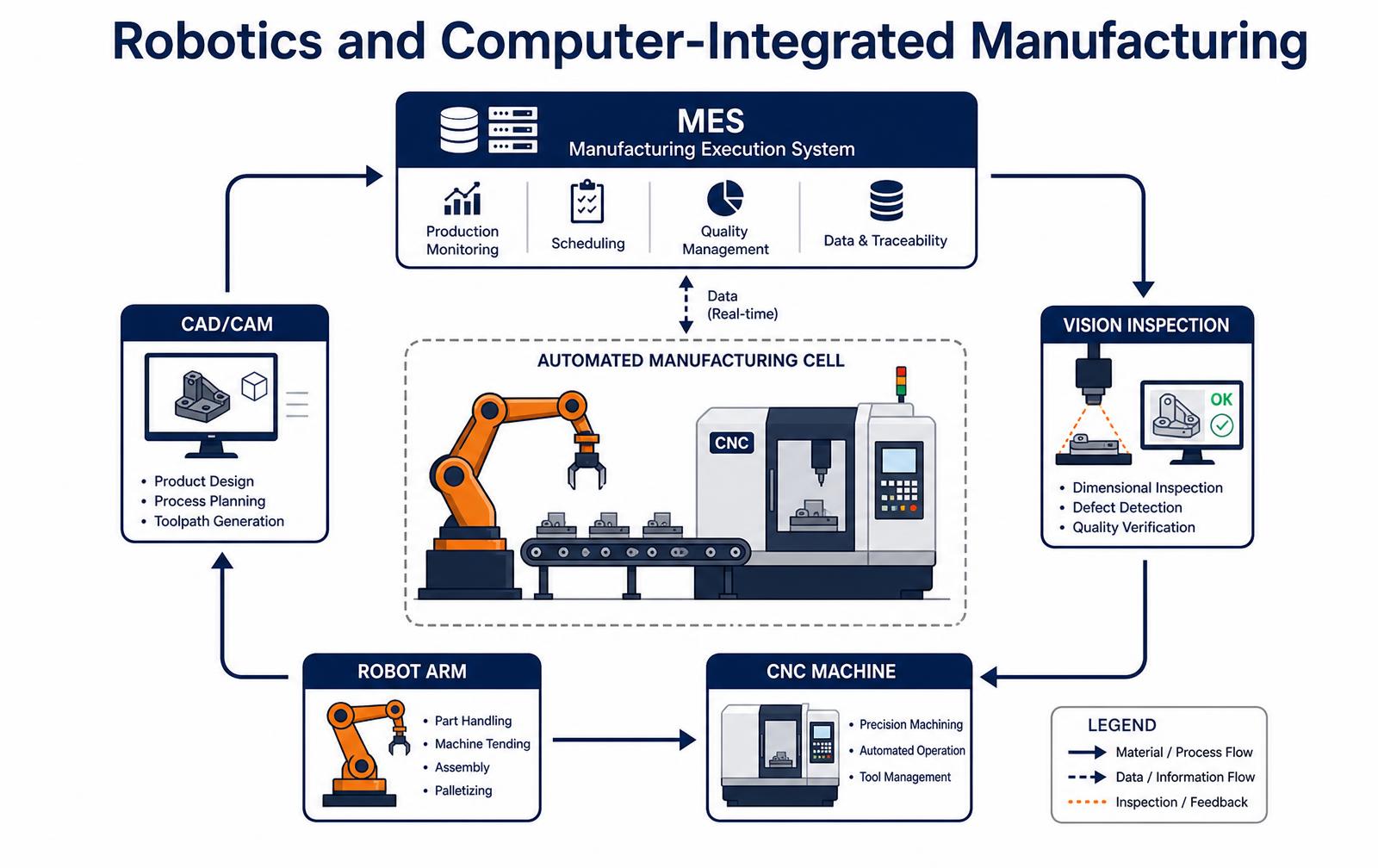
The five layers
- CAD/CAM. The part model is the single source of truth. Toolpaths, robot paths and inspection routines all generate from it, so a revision change propagates instead of being retyped.
- Robot cells. Machine tending, assembly, dispensing and palletising. Collaborative arms handle low-force tasks near people; industrial arms handle speed and payload behind guarding.
- CNC and process equipment. The machines doing the value-adding work, ideally with the ability to accept programs and report status over the network rather than at the panel.
- Vision and metrology. In-line dimensional checks and defect detection that gate the part before it reaches the next station, rather than at final QC.
- MES and data layer. Scheduling, genealogy, OEE and traceability. This is what turns a set of automated stations into a system you can actually manage.
What integration costs and returns
Investment | Typical cost | Main return | Typical payback |
|---|---|---|---|
Collaborative robot cell | $60k-$120k | Labour on repetitive tasks, night shift capacity | 12-24 months |
Industrial robot machine tending | $120k-$300k | Spindle utilisation, consistent cycle time | 18-30 months |
In-line vision inspection | $25k-$150k | Scrap and escaped-defect reduction | 9-18 months |
MES / data layer | $50k-$400k | Traceability, OEE visibility, faster changeover | 18-36 months |
CAD/CAM to cell integration | $20k-$80k | Fewer programming errors, faster new-part introduction | 12-24 months |
Why integration projects stall
- Automating an unstable process. A robot repeats variation faster. Fix process capability first, then automate.
- Parts that were never designed for automated handling. Inconsistent datums, tangling geometry and no reliable grip face force expensive custom end-effectors.
- Islands of automation. Cells that cannot exchange data leave the traceability and scheduling benefits on the table.
- No internal owner. If nobody on site can reprogram the cell, every product change becomes an integrator invoice.
- Ignoring changeover. A cell optimised for one SKU can be slower overall than manual work in a high-mix plant.
Design decisions determine how automatable a product is. See design for manufacturability and our product engineering services.
What a cobot cell really costs
Line item | Small cell (3-5 kg payload) | Mid cell (10-16 kg payload) |
|---|---|---|
Robot arm and controller | $22k-$38k | $38k-$62k |
End effector and tool changer | $3k-$12k | $8k-$25k |
Vision or force sensing | $4k-$18k | $10k-$30k |
Fixtures, guarding, fencing if required | $5k-$20k | $12k-$45k |
Integration and programming | $15k-$45k | $30k-$90k |
Total installed | $49k-$133k | $98k-$252k |
Safety: collaborative does not mean fenceless
A collaborative robot is a machine that can be made safe to work near, not a machine that is automatically safe. The application decides.
ISO/TS 15066 defines four collaborative modes, and the one you choose drives both speed and layout: safety-rated monitored stop, hand guiding, speed and separation monitoring, and power and force limiting.
A cobot holding a deburring tool or a sharp part is a hazard regardless of its own force limits, so the risk assessment covers the tool and the workpiece, not just the arm. Expect a formal risk assessment, a validated stopping distance and documented force measurements before the cell runs alongside people.
Choosing a first application
- Pick a task that runs at least four hours a day. Utilization, not cycle time, drives payback.
- Start where part presentation is already controlled. A tray or fixture beats a bin of random parts for a first project.
- Avoid tasks that need human judgement about cosmetic quality; those need vision plus a tolerance for false rejects.
- Choose a task people dislike. Machine tending, palletizing and screwdriving get support from the floor rather than resistance.
- Check the takt time honestly. A cobot running at safe speed is often slower than a person; the win is consistency across a shift.
- Plan the second application before the first is finished so the cell can be redeployed when the product changes.
Gripper and part presentation decide the cycle
Most stalled cobot projects are gripping problems wearing a robotics costume.
A two-finger parallel gripper is cheap and repeatable but needs the part in a known orientation. A vacuum cup handles flat sealed surfaces and nothing else. Soft or adaptive grippers tolerate variation at the price of cycle time and holding force.
Vision closes some of the gap, though bin picking with random orientation remains the most expensive way to feed a cell. The cheaper answer is almost always upstream: a molded tray, a simple escapement or a vibratory feeder that presents parts consistently, which turns a research problem into a fifteen-second pick.
- Fix orientation upstream with trays or fixtures before adding vision.
- Size the gripper for the worst part, including the heaviest, most deformable variant.
- Count the tool changes; each one adds seconds and a failure mode.
- Check reach and singularities with the real fixture, not a nominal layout.
- Design for redeployment: bolt-down patterns, quick-disconnect air and a documented program.
- Train two operators to teach points so the cell is not hostage to one integrator visit.
The cycle-time math that decides whether a cobot pays
Collaborative robot projects are approved on labor savings and killed by cycle time. A cobot in speed-and-separation mode runs at a fraction of an industrial arm's velocity when a human is inside its zone, so the honest calculation uses the slowed rate, not the datasheet rate.
Task | Manual cycle | Cobot cycle (safe speed) | Realistic uptime | Payback at 2 shifts |
|---|---|---|---|---|
Machine tending, single CNC | 45 s | 55-70 s | 85-92 percent | 9-16 months |
Palletizing cases to 1.8 m | 12 s/case | 10-14 s/case | 90-95 percent | 12-20 months |
Screwdriving, 8 fasteners | 38 s | 42-60 s | 80-90 percent | 18-30 months |
Inspection with vision | 20 s | 8-15 s | 92-97 percent | 10-18 months |
Mixed-part assembly | 60 s | 90-150 s | 60-80 percent | Usually never |
The pattern holds across plants: cobots win where the part presentation is repeatable and the cycle is dull, and lose where a human is making judgment calls every cycle. If the manual cycle varies by more than about 20 percent from unit to unit, fix the process before automating it.
Integrating a cell with the equipment you already own
The robot is rarely the integration problem. The problem is the twenty-year-old press, the barcode scanner with a serial port, and the fact that nobody on the floor can edit the program at 2 a.m.
- Signal the parent machine properly. Door interlocks, cycle-start, and part-present signals need a safety-rated interface, not a relay tapped off a panel light.
- Plan the data path. Cycle counts and fault codes should reach your MES or a simple database; a cell without production data cannot be improved.
- Standardize the end effector mount. One quick-change plate across cells lets you move grippers between applications instead of re-buying them.
- Train two operators per shift. Teach-pendant literacy is the difference between a cell that runs and a cell that waits for an integrator visit.
- Budget the risk assessment. ISO/TS 15066 force and pressure measurement on a collaborative application costs $3k-$10k and is required evidence, not paperwork.
Design your parts for the cell while the cell is still on paper. Flat datum faces, asymmetric features the vision system can key on, and trays that hold orientation cut integration cost more than any robot brand decision.
Where assistive robots are used today
- Eldercare and daily living. Feeding aids, transfer assists, and mobility support, bought by facilities against staffing cost rather than by individuals.
- Rehabilitation. Gait trainers and upper-limb therapy arms that deliver repeatable, instrumented sessions a therapist cannot sustain by hand.
- Wheelchair-mounted manipulators. Small payload arms that restore reach and grasp; the buyer is often an insurer or a public program, which sets the documentation burden.
- Surgical and clinical support. Positioning and instrument handling under direct clinician control.
- Workplace assistance. Lift assists and exoskeleton-adjacent tools that keep experienced operators on the line by removing the load, not the person.
Assistive robotics market trends worth designing against
Segment | Who signs the purchase order | What kills the deal | Design implication |
|---|---|---|---|
Eldercare facility | Operations or staffing director | Training burden per shift | One-button task recall, no teach pendant in daily use |
Rehabilitation clinic | Clinical director | Session throughput and documentation | Automatic session logging and export |
Home and personal mobility | Insurer or public program | Missing safety evidence | Full risk file and validated safe-speed limits from day one |
Manufacturing lift assist | Plant manager | Cycle-time loss versus manual | Payback under two years at measured uptime |
What it takes to move from prototype to a shippable assistive product
Key takeaways
Collaborative robots earn their place on tasks that are repetitive, ergonomically punishing and consistently presented. They struggle wherever variation lives. Before quoting a cell, spend a day watching the actual station: count the part orientations, the exceptions, the operator judgment calls.
If the exceptions are rare and cheap to hand off to a person, a cobot pays back in months. If the exceptions are the job, the money is better spent on fixturing, part presentation and a lighter assist device.
Frequently asked questions
What is computer-integrated manufacturing?
Computer-integrated manufacturing (CIM) is an approach where design, planning, production equipment and quality systems share one connected data environment. CAD/CAM generates programs, robots and CNC machines execute them, vision systems verify results, and an MES layer records and schedules everything, so information moves between stages without manual re-entry.
How do robotics and computer-integrated manufacturing relate?
Robots are the execution layer inside a CIM system. Robotics alone automates individual tasks. Computer-integrated manufacturing connects those robots to design data, inspection results and production scheduling so the cell adapts to the part being built and reports its own performance.
What is a realistic payback period?
Most single robot cells pay back in twelve to thirty months when the process is already stable and running more than one shift. In-line vision typically pays back fastest, in nine to eighteen months, because scrap and escaped defects are immediate costs. MES investments take longer, usually eighteen to thirty-six months.
Designing a product that has to be built at volume?
We engineer parts for automated handling, inspection and repeatable assembly from the start.
Work with LA NPDT: if you are moving from here to execution, start with our low-volume manufacturing or talk to us about design for manufacturing.
Building hardware for this market
If this research is the front end of a product decision, these are the parts of the work we handle in house.
- Mechanism and product design
Actuation, ergonomics and durability for devices people handle every day.
- Electronics and firmware
Motor control, sensing and battery systems for assistive hardware.
- Regulated path
Design controls when the device makes a clinical or mobility claim.
Cite this report
Using these figures in a pitch deck, grant application or internal memo? Cite it as:
LA New Product Development Team (LA NPDT). "Collaborative Robot Applications: A Practical Guide." 2026. https://lanpdt.com/assistive-robotics-smart-tools-market-trends-2025/
Every figure is attributed to its original source in the Sources list above. Please cite the original publisher for their own data.