Behavioral Design: Engineering How People Actually Use Products
People do not read manuals. Behavioral design accepts that and shapes the product so the correct action is the easiest one available.
August 13, 20258 min read

Written by Konstantin Dolgan, Ph.D., NPDP
Founder & CEO, Product Development Engineer
Published August 13, 2025Updated October 30, 2026
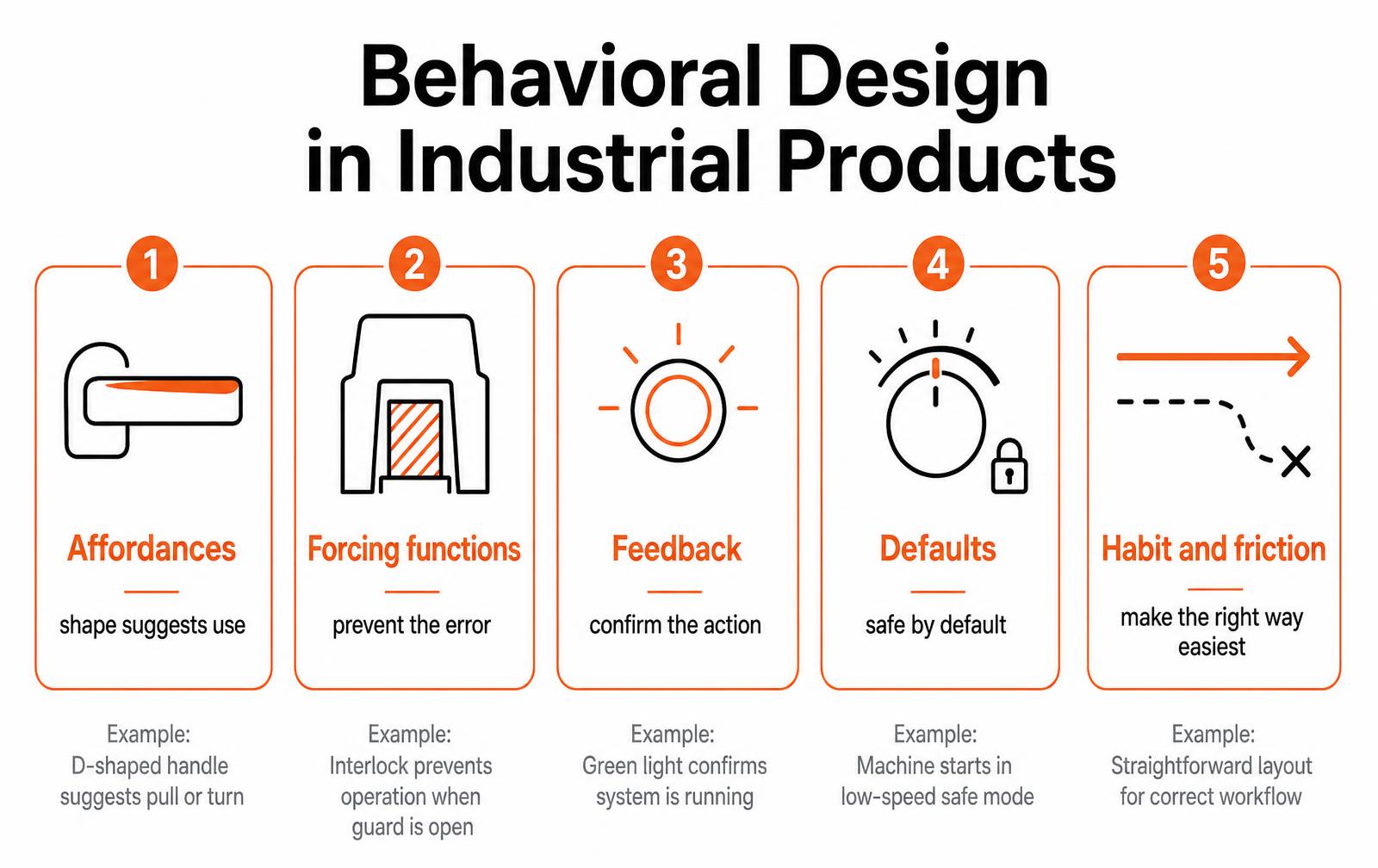
Behavioral design is the practice of shaping a product so that the desired behavior is the easiest, most obvious action available: using affordances, forcing functions, feedback, defaults and deliberate friction rather than instructions or training. In industrial and physical products it is a safety and warranty discipline, not a marketing trick.
Why behavior is an engineering problem
Most field failures attributed to "user error" are design decisions that made the wrong action possible and convenient. If an operator can install a filter backwards, some of them will, and no amount of training changes the percentage much. Behavioral design moves the fix from the human to the part geometry.
The five levers
Lever | What it does | Physical example |
|---|---|---|
Affordance | The shape signals the action | A recessed grip that can only be pulled one way |
Forcing function | Makes the wrong action impossible | Asymmetric connector, guard interlock |
Feedback | Confirms the action registered | Audible click, indicator change, haptic detent |
Default | Sets the safe state at rest | Machine powers up in low-speed mode |
Friction | Slows a costly or irreversible action | Two-hand start, deliberate cover latch |
The order matters. Prevention beats correction: a forcing function eliminates a failure mode, while a warning label only transfers responsibility for it.
Designing for the behavior you observe, not the one you expect
- Watch real use, on site. The workaround is the design brief. Tape, zip ties and propped-open guards are documented behavior.
- Map the error paths. For each step, ask what the wrong version looks like and how likely it is under fatigue, gloves, poor lighting or time pressure.
- Rank by consequence. Errors that cause injury or scrap get forcing functions; cosmetic errors get feedback.
- Design the geometry, not the manual. Keying, asymmetry and physical stops carry no training cost.
- Test with people who have never seen it. Familiarity hides every problem you are looking for.
This runs inside the same loop described in the user-centered design process: behavioral requirements are just requirements with a measurable behavior as the acceptance test.
Measuring it
Behavioral claims must be testable or they are opinions.
Metric | How to measure | Reasonable target |
|---|---|---|
First-attempt success | Naive users perform the task once, unaided | Above 90 percent for critical tasks |
Error rate per critical step | Observed trials, 15 to 20 users | Zero for safety-critical steps |
Time to correct state | Stopwatch from start to confirmed state | Set by task; compare to current solution |
Recovery rate | Share of users who notice and fix an error | Above 95 percent when errors are possible |
Field signal | Warranty codes and support tickets by cause | Downward after redesign |
Designing for the hurried, gloved, distracted user
Industrial products are rarely used under the conditions shown in the rendering. The operator is wearing gloves, the light is bad, the machine is loud, and the task is the fourth one in a twelve-hour shift. Behavioral design accepts that context as the design input rather than an edge case.
In practice that means bigger targets, unambiguous state, and feedback the body can feel through a glove (a detent, a click, a haptic pulse) instead of a colour change nobody looks at.
The cheapest behavioural fix is almost always physical constraint: make the wrong action impossible rather than warned against. A connector that only mates one way removes an entire class of service error and costs nothing at volume once the tooling exists.

Behaviour patterns and the design response
Observed behaviour | Root cause | Design response |
|---|---|---|
Operators bypass the guard | Guard adds time to a routine task | Interlock that is faster to use than to defeat |
Alarm is ignored | Too many low-value alarms | Tiered alerts; only stop-work events use the loudest channel |
Wrong cable seated | Two connectors look alike | Keyed or differently sized housings, colour secondary |
Setting drifts over a shift | Knob has no detents | Detented control with a visible home position |
Maintenance skipped | Access panel needs three tools | Captive fasteners, single tool, tool-free latch where safe |
How to test behaviour before tooling
- Run five users, not fifty. Five representative operators surface most usability defects; statistical significance is not the goal at this stage.
- Test in the real environment. Gloves, noise, PPE, low light. A quiet conference room hides the failures that matter.
- Give the task, not the instructions. Say what outcome you want, then stay silent and record where hands hesitate.
- Time the recovery, not just the task. How long it takes to notice and undo a mistake predicts field complaints better than task time.
- Log every workaround. A workaround is a specification written by the user.
Key takeaways
- Design for the degraded case: gloves, noise, fatigue and interruption are the normal operating environment.
- Physical constraint beats warning labels; keyed parts prevent errors that training never will.
- Five users in a realistic setting will find the defects that matter before tooling is cut.
- Treat every field workaround as a requirement you missed.
Behavioral design in an industrial context
- Maintenance: color-code and key every serviceable interface so the technician cannot reassemble it incorrectly.
- Consumables: physical keying prevents third-party parts that void reliability, and protects the aftermarket business.
- Setup: a device that arrives in the safe, correct default eliminates the most common installation errors.
- Cleaning and inspection: if a surface is hard to reach, it will not be cleaned; design the access, not the reminder.
- Shutdown and lockout: deliberate friction on irreversible actions is worth the extra second.
The ethics line
The same levers can be used to manipulate: friction designed to prevent cancellation, defaults designed to harvest data, feedback designed to create compulsion. The distinction is simple and worth stating in a design review: does the design make the user's intended action easier, or does it make the company's preferred action harder to escape? Products fail in the market and in court on the wrong side of that line.
Frequently asked questions
What is behavioral design?
Behavioral design is the practice of shaping a product, interface or environment so the desired behavior becomes the easiest and most obvious option. It uses affordances, forcing functions, feedback, defaults and friction to influence action rather than relying on instructions, warnings or training.
How is behavioral design used in physical products?
In physical products it appears as keyed connectors that cannot be inserted backwards, interlocks that stop a machine when a guard opens, audible clicks that confirm a latch is closed, safe power-up defaults, and two-hand controls that add deliberate friction before a hazardous action.
What is a forcing function in design?
A forcing function is a design feature that makes an incorrect action physically impossible or blocks progress until a required step is completed. Asymmetric plugs, safety interlocks and caps that must be pressed before turning are common examples.
What is the difference between behavioral design and UX design?
UX design covers the entire experience of using a product, including clarity, efficiency and satisfaction. Behavioral design is narrower and focuses specifically on influencing which action people take, drawing on behavioral science concepts such as defaults, friction and feedback loops.
How do you test behavioral design?
Give the product to users who have never seen it and measure first-attempt success, error rate per critical step, time to reach the correct state and recovery rate. Fifteen to twenty participants is typical when you need to prove a target rather than just discover problems.
Is behavioral design manipulative?
It can be, and the test is whose goal it serves. Making a user's intended action easier and safer is good design. Making the company's preferred action difficult to escape, such as burying cancellation behind friction, is a dark pattern that damages trust and increasingly attracts regulatory attention.
Designing for error, not just for use
Industrial environments guarantee that some fraction of interactions will happen wrong: the wrong connector, the wrong sequence, the wrong moment. Behavioral design in that context is mostly error engineering: deciding in advance which mistakes are possible, which are recoverable, and which the physical design must make impossible.
Error types and the design response
Error type | Example | Design response | Strength |
|---|---|---|---|
Wrong connection | Cable in the wrong port | Keyed, asymmetric connectors | Prevents entirely |
Wrong sequence | Power applied before lockout | Interlock or mechanical gate | Prevents entirely |
Omission | Skipping a torque step | Visual torque indicator or click tool | Detects |
Wrong part | Similar consumables swapped | Distinct geometry or color coding | Prevents or detects |
Slip under time pressure | Hitting the adjacent control | Guarded, spaced, differently shaped controls | Reduces |
Misreading state | Assuming a machine is off | Unambiguous, distant-readable indicator | Detects |
Rank responses by strength: designing an error out beats detecting it, detection beats a warning label, and a label beats training. Most field incident reports end with a recommendation to retrain, which is the weakest control available and the reason the same incident recurs.
Error-proofing review
- List every possible wrong action at each interaction point.
- Classify each as preventable, detectable or only warnable.
- Push at least the safety-critical ones up to prevention.
- Test with gloved, hurried users in realistic lighting.
- Track field incidents back to the control that failed, not the person.
Key takeaways
- Behavioral design in industry is mostly designing errors out physically.
- Prevention beats detection; labels and training are the weakest controls.
- Test with users under realistic time pressure and protective equipment.
Designing an industrial product people must use correctly?
Designing for the Behavior You Actually Observe
Behavioral design starts where the specification ends: with what people do when nobody is watching and the manual is still in the box. In industrial products that gap is expensive, because misuse shows up as warranty claims, service calls, and safety incidents rather than as a bad review.
| Observed behavior | Design response | Failure avoided |
|---|---|---|
| Operators skip the guard to save seconds | Interlock that is faster with the guard than without it | Injury and downtime |
| Users force connectors in the wrong orientation | Asymmetric keying and tactile detent | Bent pins, field returns |
| Maintenance intervals ignored | Visible wear indicator instead of a logbook | Premature failure |
| Settings drift after cleaning | Detented controls with a defined home position | Out-of-spec output |
Affordance, Feedback, and Cost of Error
Three levers do most of the work. Affordance tells the hand what to do before the brain reads anything: a recessed surface invites a thumb, a raised ridge says grip here. Feedback confirms the action happened; a click, a detent, or a change in resistance beats an indicator light in a noisy shop. Cost of error decides how much protection an action deserves: a reversible adjustment can be one motion, an irreversible one should require two deliberate actions.
- Map every user action to reversible or irreversible before drawing the interface.
- Give irreversible actions physical friction, not just a confirmation prompt.
- Prefer mechanical feedback over visual feedback for gloved or eyes-busy use.
- Test with the actual gloves, lighting, and posture of the real environment.
- Count the steps required for the correct path and the shortcut path; if the shortcut is shorter, redesign.
A Practical Behavioral Review
Run this review at the functional prototype stage, before tooling locks the geometry. Recruit five to eight people who match the real operator profile, give them the task and nothing else, and record hands rather than faces.
- Hand them the product in its shipping state and time first successful use.
- Note every hesitation longer than two seconds and the object they looked at during it.
- Ask them to perform routine maintenance without instructions.
- Introduce a deliberate fault and observe the recovery path.
- Score each task: completed unaided, completed with a hint, failed.
Any task that fewer than four of five participants complete unaided is a design defect, not a training problem. Fixing it in CAD costs hours; fixing it after tooling costs weeks and a change order.
Behavioral Design Questions We Hear Most
How is behavioral design different from ergonomics?
Ergonomics asks whether a person can physically operate the product comfortably and safely. Behavioral design asks what they will actually choose to do, including the shortcuts they take when they are tired, rushed, or confident they know better. A control can be perfectly ergonomic and still be routinely bypassed.
Can behavioral problems be solved with better labeling?
Rarely. Labels are read once, at most, and often never in an industrial setting. If the correct action requires reading, the design has already failed for a meaningful share of users. Geometry, resistance, and sequencing carry the instruction more reliably than printed text does.
How many participants does a behavioral study need?
Five to eight people who genuinely match the operator profile will expose most of the significant issues on a single-purpose device. Recruiting quality matters far more than sample size: two real operators will teach you more than twenty colleagues.
When in the program should this happen?
At the first functional prototype, and again after the first design revision. Behavioral findings almost always require geometry changes, so they need to land before the design freeze that releases tooling.
Does this apply to products with software interfaces?
Yes, and the stakes are higher, because software teams can ship a change quickly and therefore tend to defer the hard structural decisions. The physical shell still determines posture, grip, and viewing angle, and those constrain what the interface can reasonably ask for.
Work with LA NPDT: if you are moving from here to execution, start with our AI product development or talk to us about software development services.
Filed under:Uncategorized
Services related to this guide
- Product design servicesIndustrial design and CAD taken all the way to manufacturable files.
- Best industrial design firmsWhich studios take an idea from form to manufacturable hardware, and what they charge.
- Prototype designLooks-like, works-like or pre-production: what each proves and what it costs.
- Product development examplesReal projects we designed, prototyped and shipped.