Hardware beta testing: how to run a prototype beta that finds real problems
A beta test is the first time your product lives without you in the room. Run it well and it finds the problems your bench tests missed. Run it loosely and you get a pile of opinions and a few dead units nobody can explain.
October 10, 202610 min read

Written by Konstantin Dolgan, Ph.D., NPDP
Founder & CEO, Product Development Engineer
Published October 10, 2026

What is hardware beta testing?
Hardware beta testing is a structured trial where near-final prototype units are used by real people, in the places they will actually use the product, for a defined period. You are looking for failures, usability problems, installation issues, and surprises that do not show up on an engineer's bench.
Beta testing hardware is different from beta testing an app. You cannot push a fix to every unit overnight if the problem is a connector, a seal, or a battery. Each unit costs real money to build, it can break or get lost, and some products carry legal obligations the moment they leave your building. That is why a hardware beta needs more planning up front than a software one.
It also has a clear place in the development path. NASA's technology readiness scale describes the same progression: a fully functional prototype first, then a demonstration of that prototype in the real operating environment (NASA, Technology Readiness Levels). For a consumer or industrial product, the beta is that real-environment step. For a wider view of testing stages, see stages of product testing and their purposes.
Alpha prototype vs beta prototype
Alpha prototype | Beta prototype | |
|---|---|---|
Main question | Does the core idea work? | Does it work for real users, in real conditions? |
Who tests | Your team, sometimes a friendly expert | Outside users or customer sites |
Electronics | Dev boards, early custom PCB, hand fixes | Custom PCB close to the release design |
Firmware | Core functions, debug builds | Feature complete for the test, with logging |
Enclosure | 3D printed test-fit parts | Near-final geometry, printed, machined, or soft-tooled |
Assembly | Hand built by engineers | Repeatable steps, close to how production will build it |
Output | Go or no-go on the concept, design direction | Failure list, usability findings, release readiness |
Many hardware teams also use the EVT, DVT, PVT build names. The labels vary by company; what matters is that the beta units are representative of what you plan to ship. Our guide to the transition from prototype to pilot production covers how these builds connect, and types of prototypes explained covers the earlier proof-of-concept and functional stages.
Is your beta prototype ready? Entry checklist
Do not ship beta units until you can tick these boxes:
- Units pass your own functional test on the bench, every unit, not just the best one.
- The core use case works end to end, including setup, charging or power, and connectivity if it has any.
- Known safety risks are addressed (hot surfaces, sharp edges, battery protection, pinch points).
- You have run basic stress checks that match the use: a few drops, heat and cold, moisture, vibration, or long run time. See structured failure testing and design for reliability.
- Every unit has a serial number and you know its hardware revision and firmware version.
- Firmware can record useful data (errors, resets, battery level, usage) and you can get that data back.
- You can update firmware in the field, or you have a plan to swap units.
- You know which rules apply before units leave your premises (see below).
If several boxes are empty, you are still in alpha. That is fine. Fix those items first; a beta spent finding problems you already knew about is wasted time and units.
How to write a beta testing plan
A beta testing plan can fit on two pages. It should answer:
- What questions must this beta answer? Write 3 to 5. For example: does the seal hold through a wet season, can a non-technical user install it from the quick-start card, does the battery last a full shift.
- What counts as a failure? Define it before you see the data: a reset, a lost connection longer than a set time, a cracked housing, a user who gives up during setup.
- How many units and spares? Enough to see the same failure more than once across different users and settings, plus spares so a dead unit does not end a tester's participation. Unit cost and how varied your users are drive the number.
- Who and where? The mix of users, sites, and conditions you need to cover (see next section).
- How long? Long enough to cover the real use cycle: setup, normal use, charging or maintenance, and the conditions that matter.
- What gets logged, and how? Device logs, a short weekly check-in, photos of installs, and a simple form for issues.
- Who owns triage? One person who reads every report and decides what happens next.
- Exit criteria. What has to be true to end the beta and move on (see below).
- Unit return and disposal. How units come back, and what happens if they do not.
Choosing beta testers and test sites
- Match your real buyers, not your friends. Friends forgive. Customers do not. Include people who have never seen the product.
- Cover the conditions. If the product goes outdoors, test in heat, cold, rain, and sun. If it installs on equipment, test on more than one model of that equipment.
- Include at least one difficult site. The farthest location, the noisiest RF environment, the user who reads no instructions.
- Set expectations in writing. A short beta agreement: what testers do, how long, how to report problems, confidentiality, that units remain your property and must be returned, and any safety instructions.
- Make reporting easy. A QR code on the unit that opens an issue form beats a long email thread.
- Stay reachable. Give testers one contact who answers quickly. A tester who waits a week for help stops testing.
Building and shipping beta units
Beta units are a small production run. Treat them that way.
- Electronics. Build boards from a controlled BOM and a known PCB revision. Hand rework on beta boards should be documented on each unit's record. If you are still moving from a dev board to a custom board, start with our electronic product prototyping guide.
- Firmware. Lock a beta firmware version, tag it in version control, and add logging for resets, error codes, battery state, and key user actions. Plan how data comes back: app sync, cloud upload, or a USB pull when the unit returns.
- Enclosures. For a beta, the housing should match the final geometry closely. 3D printing works well here: PLA is fine for quick test-fit checks on the bench, and ASA is the better choice for beta housings that face heat, sunlight, or outdoor use. See 3D printing in prototype development.
- Assembly. Write simple assembly steps and follow them for every unit. If each unit is built differently, you cannot tell a design problem from a build problem.
- Test every unit before it ships. A short end-of-line functional check, with results saved against the serial number.
- Labels and packaging. Serial label, any required regulatory notice (see below), a quick-start card, and packaging that survives shipping.
- Spares and tools. Ship or hold spare units, cables, and mounting hardware so one broken part does not stop the test.
Rules to check before units leave your bench
This section is general information, not legal advice. Confirm your specific case with your test lab or counsel.
- Wireless and other RF devices (FCC). Under 47 CFR 2.805, an unlicensed device under FCC Parts 15, 18, or 95 may be operated before equipment authorization for "evaluation of performance and determination of customer acceptability, during developmental, design, or pre-production states." Units used away from your facility must carry this notice: "This device has not been authorized as required by the rules of the Federal Communications Commission. This device is not, and may not be, offered for sale or lease, or sold or leased, until authorization is obtained." Units must be retrieved or rendered inoperable when the test ends, and they may not be sold (47 CFR 2.805, 47 CFR 2.803). In practice, that means no paid "beta program" for uncertified radios. FCC also adopted equipment authorization changes in September 2026 that reach components from Covered List entities (Federal Register, Sept. 11, 2026); see our FCC Covered List 2026 component checklist before you freeze the beta BOM.
- Lithium batteries. Battery protection, charging behavior, and shipping rules matter more once units are in homes and vehicles. See our note on CPSC lithium battery rules in 2026.
- Medical devices. Putting an unapproved device to use on patients or study subjects can be a clinical investigation under FDA's investigational device exemption rules. Talk to your regulatory advisor before any clinical beta (FDA, Investigational Device Exemption). See also medical device prototyping.
- Free units and public reviews. If testers get free units and post about the product, the FTC treats that as a material connection that should be disclosed (16 CFR Part 255, Endorsement Guides). Put the disclosure expectation in the beta agreement.
Collecting and triaging beta feedback
Log every report against a serial number, firmware version, and date. Then sort it:
Severity | Example | Typical action |
|---|---|---|
Critical | Safety risk, overheating, battery swelling, unit dead | Pull affected units, stop the test at that site, root cause first |
Major | Core function fails, frequent resets, lost data | Fix before release; may need a new beta firmware or hardware revision |
Minor | Annoying behavior, unclear instructions, cosmetic wear | Fix before release if cheap; otherwise schedule |
Request | New feature or preference | Park for a later version unless many testers ask |
A few habits make triage work:
- Reproduce before you fix. Ask for the unit back, or the logs, before redesigning anything.
- Look for patterns. One cracked housing may be an accident. The same crack in the same spot at three sites is a design problem.
- Separate design, build, and user problems. A loose connector on one unit may be assembly. A connector that loosens on every unit is design.
- Close the loop with testers. Tell them what you changed. They test harder when they see results.
Once the design is released for production, changes found late should go through a controlled engineering change order process so the factory, purchasing, and your test data stay on the same revision.
Exit criteria: when the beta is done
End the beta when the plan's questions are answered, not when the calendar runs out. Typical exit criteria:
- No open critical issues, and every major issue has a verified fix.
- Fixes have been tested on updated units, ideally at the sites where the problem appeared.
- The test covered the conditions in the plan (seasons, sites, user types, run time).
- Installation and setup work for new users with the actual instructions.
- You have a list of design changes to carry into the production design, and a decision on what waits for a later version.
- All units are returned, disabled, or accounted for.
Next comes preparing the release package and the first production parts. Our prototype to production steps and first article inspection checklist cover what follows.
Common hardware beta testing mistakes
- Shipping alpha hardware and calling it beta. Testers spend the trial reporting problems you already knew about.
- No serial numbers or firmware versions. You cannot tell which units had which fix.
- No logging. "It stopped working" with no data is hard to act on.
- Testers who are all friends and family. Polite feedback hides real problems.
- Too few spares. One failure ends a site's participation.
- Ignoring the rules. Selling uncertified radios, or giving out units with no notice label.
- No owner for triage. Reports pile up and testers lose interest.
- No exit criteria. The beta drifts on, or ends before the hard conditions were tested.
How LA NPDT supports beta builds
LA NPDT is a Louisiana product development firm (Ruston / statewide) that designs and builds prototypes for founders and product teams: mechanical CAD, electronic design, firmware, 3D printed parts, and assembly under one roof. For beta builds, we help define the beta prototype, build traceable units, add the logging the test needs, and turn field findings into design changes.
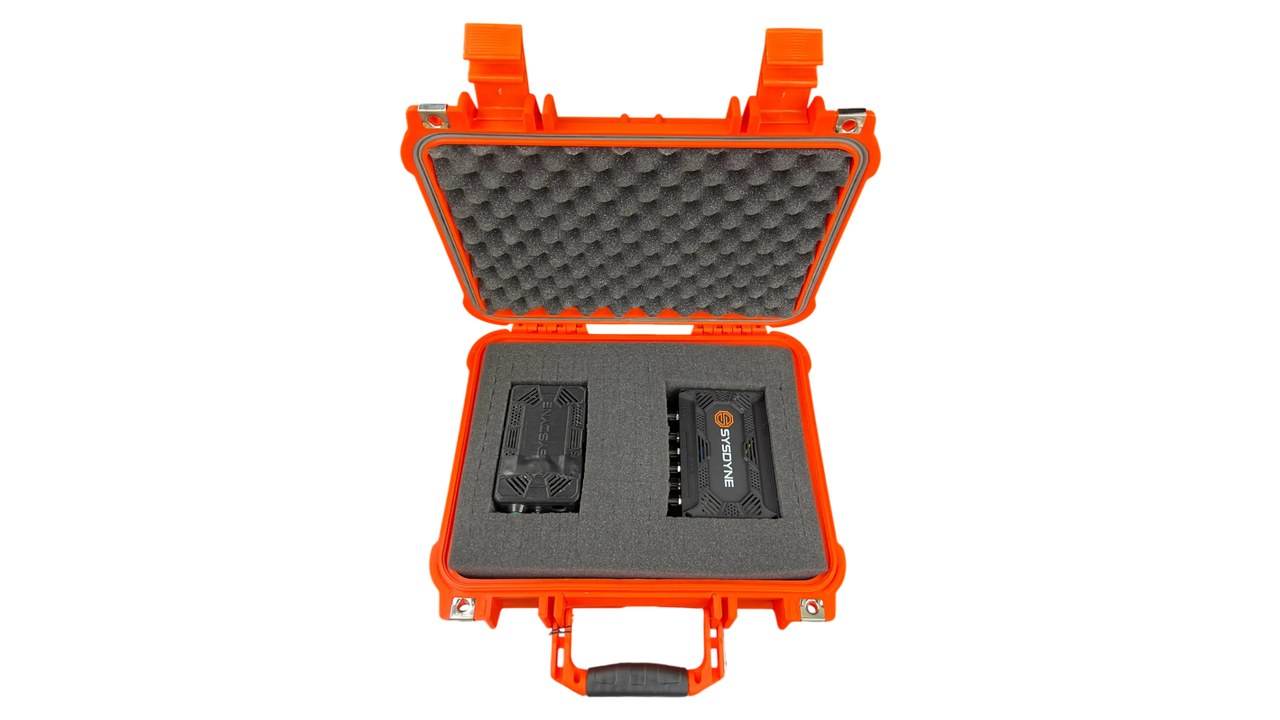
One example from our published work: on the Sysdyne delivery sensor project, the first prototype was installed and run against the customer's software, the design was iterated around their findings, beta units shipped, and one of our engineers travelled to their facility to help install them, troubleshoot the integration, and support testing on real trucks.
If you have a working prototype and are planning a beta, you can book a free 20-min call, explore prototype design and rapid prototyping, or apply to partner with us. Phone: +1 318-200-0526.
Have a working prototype and planning a beta?
Talk with an engineer about building beta units you can trace, test, and learn from. Phone: +1 318-200-0526.
Sources
Frequently asked questions
What is hardware beta testing?
Hardware beta testing is a structured trial where near-final prototype units are used by real people in the real environment, outside your lab, for a set period. The goal is to find failures, usability problems, and installation issues that bench tests miss, before you release the design for production.
What is the difference between an alpha prototype and a beta prototype?
An alpha prototype proves the core function and is usually tested by the team. A beta prototype is close to the final design in electronics, firmware, enclosure, and assembly, and it is tested by outside users in real conditions.
How many units do you need for a hardware beta test?
Enough to see the same failure more than once across different users and settings, plus spares to swap out failed units. The right number depends on how varied your users and environments are and how much each unit costs to build. Decide it in the beta testing plan, not after units are built.
How long should a hardware beta test run?
Long enough to cover the real use cycle: setup, normal daily use, charging or maintenance, and the conditions that matter, such as temperature, moisture, or vibration. Set the duration and exit criteria in the plan before the first unit ships.
Can you give beta testers a wireless device before FCC certification?
Possibly, under narrow conditions. FCC rules allow operation of some unlicensed devices before authorization for evaluation and customer acceptability during development, if units off your premises carry the required notice, are not sold, and are retrieved or disabled when the test ends. Confirm your case with an accredited test lab.
What should you do with beta feedback?
Log every issue against a unit serial number and firmware version, sort it by severity, and decide fix now, fix before release, or accept. Changes after design release then go through your engineering change order process.
Tagged:PrototypingTesting
Services related to this guide
- Product design servicesIndustrial design and CAD taken all the way to manufacturable files.
- Rapid prototypingWorking prototypes in days, from 3D printing to vacuum casting.
- Electronic design servicesSchematic, PCB layout, firmware and bring-up, through to production handoff.
- Product development examplesReal projects we designed, prototyped and shipped.